# NSQ - Things that nobody will tell you
This article requires a general understanding of the message queue system. If you're not familiar with that concept, I recommend you understand the concept first.
Nowadays companies promote the microservice based architecture for the enterprise level projects and message queue service is the fundamental component to achieve that.
**Microservice** is nothing else but the division of a big project into the smaller applications based on their work scope yet connected to each other which shares essential information from one to another app to move forward the workflow of the system.
### So how [NSQ](https://nsq.io/) works?
Don't worry, I will not flood this article with the same things which have already been written many times over the web. Go through the given below articles to have more insight about NSQ.
- https://segment.com/blog/scaling-nsq/
- https://dev.to/vguleaev/nsq-tutorial-build-a-simple-message-queue-using-nsq-43eh
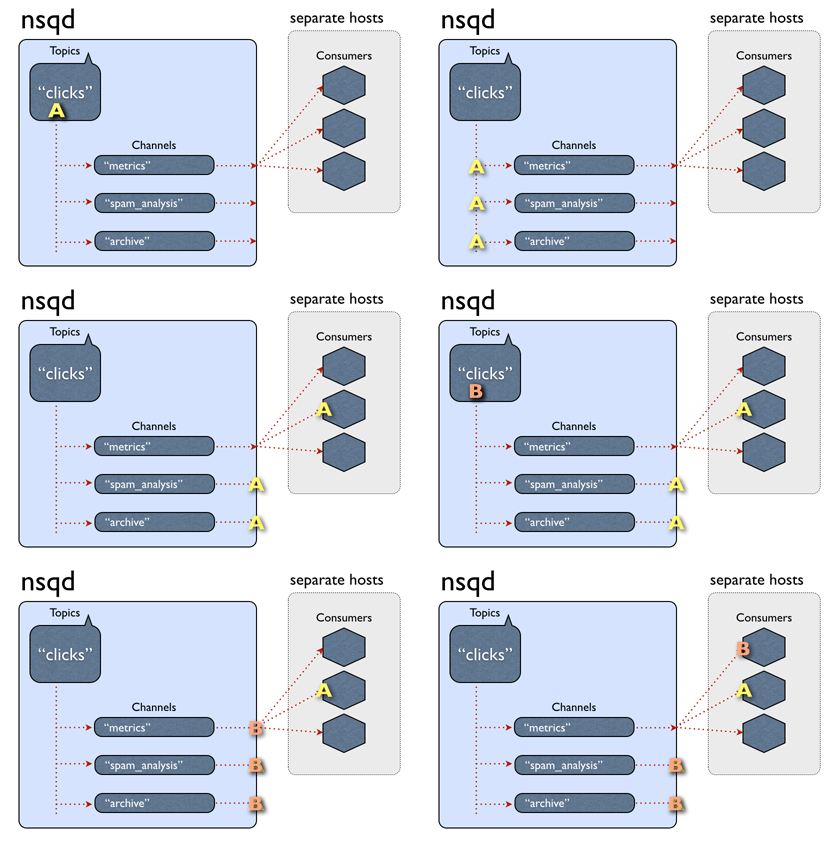
That's right, now you've knowledge how NSQ does its job but in **production work** the most important aspect is to handle messages which consumer(subscriber) is not able to process, mostly *due to the failure of business logic while processing the message.*
NSQ supports many languages to process messages at [client side](https://nsq.io/clients/client_libraries.html).
Let's take a looks at [JavaScript](https://github.com/dudleycarr/nsqjs) implementation
### Without failure handling
```javascript
const nsq = require('nsqjs')
const reader = new nsq.Reader('sample_topic', 'test_channel', {
lookupdHTTPAddresses: '127.0.0.1:4161'
})
reader.connect()
reader.on('message', msg => {
// TODO: Business logic to process message
console.log('Received message [%s]: %s', msg.id, msg.body.toString())
msg.finish()
})
```
Message considered as processed once `msg.finish()` is called inside the `Reader.MESSAGE` event. If the `finish()` method is not called then the nsq client add the message in queue again subsequently after some delay until the message is not processed successfully.
NSQ client decides to requeue the message based on the `maxAttempts` configuration, after the max attempts, the message is declared as a dead and marked as finished automatically; and that's where we have to log down dead message to handle it manually.
>
[maxAttempts: 0](https://github.com/dudleycarr/nsqjs#usage)
>
The number of times a given message will be attempted (given to MESSAGE handler) before it will be handed to the DISCARD handler and then automatically finished. 0 means that there is no limit. If no DISCARD handler is specified and maxAttempts > 0, then the message will be finished automatically when the number of attempts has been exhausted.
### With failure handling
```javascript
const nsq = require("nsqjs");
const reader = new nsq.Reader("chat", "chat", {
lookupdHTTPAddresses: "127.0.0.1:4161",
});
reader.connect();
reader.on("message", (msg) => {
let isProcessed = processMessage(msg);
if(isProcessed) {
msg.finish();
}
});
reader.on("discard", (msg) => {
// TODO: Log dead messages in the Database or File to handle it manually.
msg.finish();
});
const processMessage= (msg) => {
try{
// TODO: Business logic to process message
console.log("Received message [%s]: %s", msg.id, msg.body.toString());
return true
}catch(error) {
console.error(error)
return false
}
}
```
Consider `processMessage ` is the function where the app's logic resides to take action on a message. If everything goes ok, we mark the message as finished by calling the `finish` method else the message will be requeued constantly until max attempt is reached.
After the max retry, `Reader.DISCARD` is called, where dead message detail can be written to the file or database to handle it manually.
As I said earlier, nsq has different clients to process messages and different clients may have different ways to handle dead messages.
For instance, [pynsq](https://pynsq.readthedocs.io/en/latest/) client is for python and it has [`giving_up()`](https://pynsq.readthedocs.io/en/latest/reader.html#nsq.Reader.giving_up) API to handle dead messages.
### Bonus
There are many distributed open source messaging systems and Philip Feng has described most of them in his [article](https://medium.com/@philipfeng/modern-open-source-messaging-apache-kafka-rabbitmq-nats-pulsar-and-nsq-ca3bf7422db5)
Credits:
Banner image [siskav](https://pixabay.com/photos/queue-playmobil-to-wave-655820/), nsq gif [nsq](https://nsq.io/overview/design.html)
NSQ Article reference: [Calvin French-Owen](https://segment.com/blog/scaling-nsq/), [Vladislav Guleaev](https://dev.to/vguleaev/nsq-tutorial-build-a-simple-message-queue-using-nsq-43eh), [Philip Feng Ph.D](https://medium.com/@philipfeng/modern-open-source-messaging-apache-kafka-rabbitmq-nats-pulsar-and-nsq-ca3bf7422db5)